

Minimal Setup
For a runnable development setup, use the self-hosting examples, which include Docker Compose files and configuration. For development and testing, use:- One PowerSync container running in unified mode (API and replication): 1 vCPU, 512 MiB memory.
- A MongoDB or Postgres bucket storage database. For MongoDB, use one node in replica set mode: 1 vCPU, 2 GiB memory (M10+ on Atlas).
- A load balancer for TLS.
Production
Run API and replication in separate containers so you can scale them independently.Storage Requirements
You can use MongoDB or Postgres for bucket storage, independently of your source database:- MongoDB supports storage version 4 and optional S3 object storage. Use a three-node replica set for production.
- Postgres uses storage version 2. It does not support storage version 4 or S3 object storage.
Compute Sizing
Use these CPU and memory settings as a starting point. These may be scaled up or down depending on your specific load patterns.Replication Container
Runstart -r sync to replicate source changes into bucket storage.
Only one process can replicate from the source database at a time. Running multiple replication containers provides failover, not more throughput. It is recommended to run 2 replication processes for failover purposes.
During rolling deploys or failover, PSYNC_S1003 is expected briefly while another process holds the replication lock.
Size replication for source database write volume, row size, and buckets per row. A row in ten buckets creates more replication work than a row in one bucket. Initial replication and catch-up after a large batch update can need more capacity than steady-state replication.
Use replication lag, replication throughput, CPU, memory, and database metrics to assess capacity.
API Containers
Run at least two API containers in production for high availability. Scale horizontally by adding API containers as the concurrent client load grows. Runstart -r api for client connections. Collect metrics separately from API and replication containers.
The max_concurrent_connections config parameter determines the maximum number of concurrent client connections that each API process can handle. The default is 200. We recommend keeping autoscaling targets below the max_concurrent_connections limit (e.g. ~100 concurrent connections per API process) to allow for headroom.
Depending on the use case, handling up to 1,000 concurrent clients per API process is possible. Contact us to discuss your specific requirements and we will recommend an optimal setup.
Compact Job
Runcompact as a separate scheduled job, hourly for storage version 4 or daily for storage version 2.
Compaction resources depend on bucket size, accumulated changes, and concurrency. Monitor completion, duration, CPU, and peak memory to size the job for your dataset. If jobs fail or overlap, check the compact job’s CPU and memory usage and bucket storage performance before changing resources or the schedule. See Compacting Buckets.
Memory Configuration
Set the environment variableNODE_OPTIONS=--max-old-space-size-percentage=80 for the API, replication, and compact containers. This allocates 80% of the container’s assigned memory to the Node.js heap. This avoids manually retuning when scaling resources up or down.
Load Balancer
Use a redundant load balancer to terminate TLS and distribute connections across API containers. Host the API on a dedicated subdomain. For HTTP streaming with nginx, add this proxy block to your TLS server configuration. Replacepowersync:8080 with your PowerSync API hostname and port. Disabling response buffering lets sync data reach clients as it arrives.
Health Checks
Configure load-balancer health checks to poll/probes/liveness. See Health Checks.
Migrations
Occasionally, new versions of the PowerSync Service image may require migrations on the underlying storage database. This is also specifically required the first time the service starts up on a new storage database. Replication containers run storage migrations on startup. Unified containers, which run both API and replication, also run them. API containers do not run migrations. Large migrations can delay startup during an update. To run migrations as a separate job before replacing the containers, disable automatic migrations:service.yaml
migrate up as a separate job before each deployment, including the first.
Backups
Keep non-secret configuration in version control and credentials in a secrets manager. None of the containers use any local storage, so no backups are required there. Recover PowerSync’s sync data by re-replicating from the source database. Allow for the time and capacity needed for full replication and for clients to download their data again.Self-Hosted Architecture Diagram
The diagram omits S3 object storage.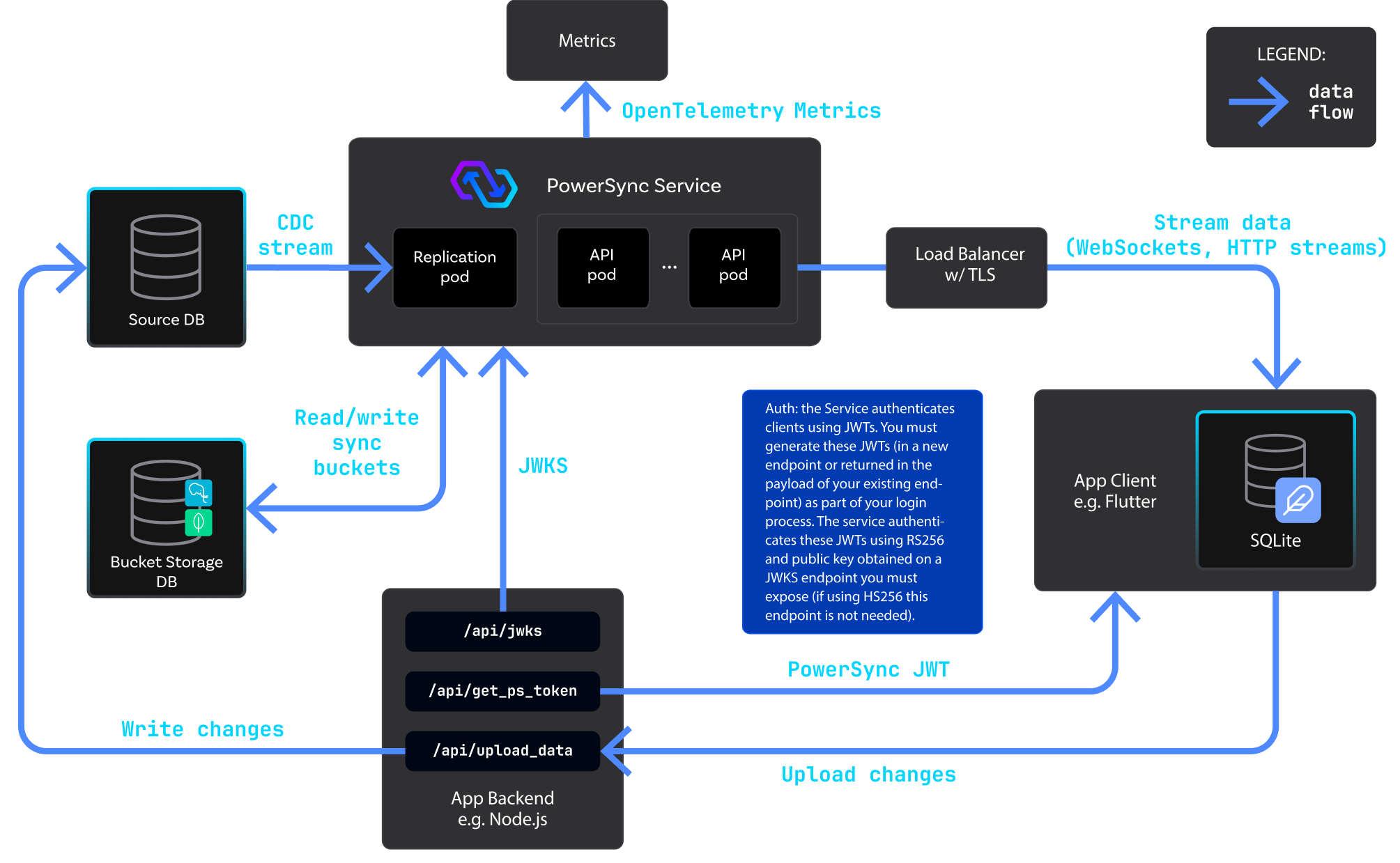
PowerSync Deployment Architecture