

Sync Streams — Recommended
With Sync Streams, you write SQL-like queries to define streams of data. Clients subscribe to the streams they need, either on-demand or automatically on connect. Sync Streams are the recommended path to achieve for both new and existing projects. Key improvements in Sync Streams over legacy Sync Rules include:- On-demand syncing: You define Sync Streams on the PowerSync Service, and a client can then subscribe to them one or more times with different parameters, on-demand. You still have the option of auto-subscribing streams when a client connects, for “sync data upfront” behavior.
- Temporary caching-like behavior: Each subscription includes a configurable TTL that keeps data active after the client unsubscribes, acting as a warm cache for re-subscribing.
- Simpler developer experience: Simplified syntax and mental model, and capabilities such as your UI components automatically managing subscriptions (for example, React hooks).
powersync migrate sync-rules in the CLI to generate a draft from your current config. See the migration guide for details.
Sync Streams
Sync Rules (Legacy)
Sync Rules is the legacy approach for controlling data sync. It remains available and supported for existing projects:Sync Rules (Legacy)
How It Works
Each PowerSync Service instance has a deployed Sync Streams (or legacy Sync Rules) configuration. This takes the form of a which contains:- In the case of Sync Streams: Definitions of the streams that exist, with a SQL-like query (which can also contain limited subqueries), which defines the data in the stream, and references the necessary parameters.
- In the case of Sync Rules: Definitions of the different buckets that exist, with SQL-like queries to specify the parameters used by each bucket (if any), as well as the data contained in each bucket.
A parameter is a value that can be used in Sync Streams (or legacy Sync Rules) to create dynamic sync behavior for each user/client. Each client syncs only the relevant buckets based on the parameters for that client.
- Sync Streams can make use of authentication parameters from the JWT token (such as the user ID or other JWT claims), connection parameters (specified at connection), and subscription parameters (specified by the client when it subscribes to a stream at any time). See Using Parameters.
- Sync Rules can make use of authentication parameters from the JWT token, as well as client parameters (passed directly from the client when it connects to the PowerSync Service).
The concept of buckets is core to PowerSync and key to its performance and scalability. The PowerSync Service architecture overview provides more background on this.
- In Sync Streams, buckets and parameters are implicit — they are automatically created based on the streams, their queries and subqueries. You don’t need to explicitly define the buckets that exist.
- In legacy Sync Rules, buckets and their parameters are explicitly defined.
- Selecting only specific tables/collections and columns/fields to sync.
- Filtering data based on static conditions.
- Transforming column/field names and values.
Sync Streams/Rules Determine Replication From the Source Database
A PowerSync Service instance replicates and transforms relevant data from your backend source database according to your Sync Streams/Sync Rules. During replication, data and metadata are persisted in buckets on the PowerSync Service. Buckets are incrementally updated so that they contain the latest state as well as a history of changes (operations). This is key to how PowerSync achieves efficient delta syncing — having the operation history for each bucket allows clients to sync only the deltas that they need to get up to date (see Protocol for more details).As a practical example, let’s say you have a bucket named
user_todo_lists that contains the to-do lists for a user, and that bucket utilizes a user_id parameter (which will be embedded in the JWT). Now let’s say users with IDs A and B exist in the source database. PowerSync will then replicate data from the source database and create individual buckets with IDs user_todo_lists["A"] and user_todo_lists["B"]. When the user with ID A connects, they can efficiently sync just the bucket with ID user_todo_lists["A"].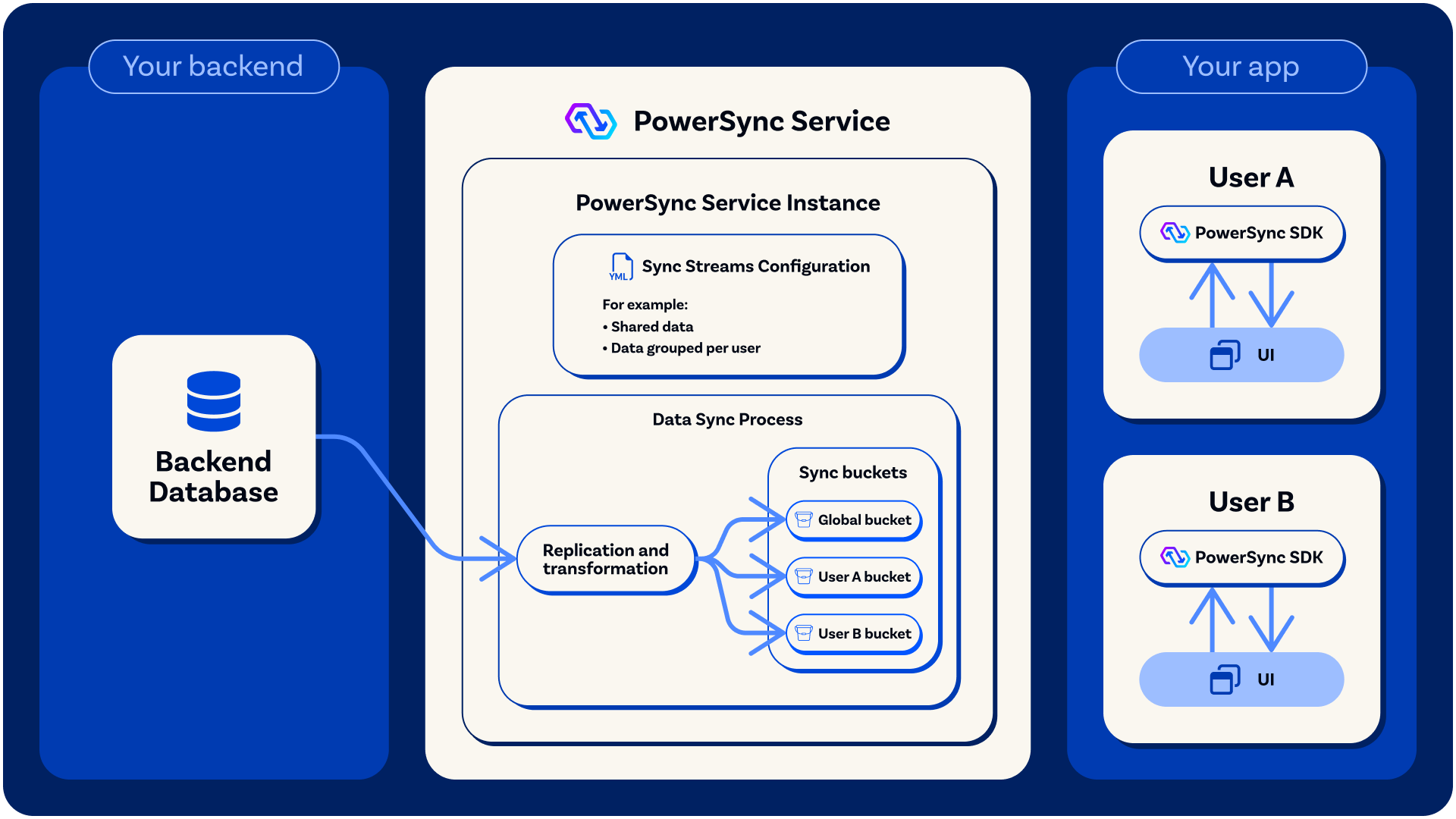
Data is replicated from the source database into buckets.
Sync Streams/Rules Determine Real-Time Streaming Sync to Clients
Whenever buckets are updated (buckets added or removed, or operations added to existing buckets), these changes are streamed in real-time to clients based on the Sync Streams/Sync Rules. This syncing behavior can be highly dynamic: in the case of Sync Streams, syncing will dynamically adjust based on the stream subscriptions (which can make use of subscription parameters), as well as connection parameters and authentication parameters (from the JWT). In the case of Sync Rules, syncing will dynamically adjust based on changes in client parameters and authentication parameters. The bucket data is persisted in SQLite on the client-side, where it is easily queryable based on the client-side schema, which corresponds to the Sync Streams/Rules.For more information on the client-side SQLite database structure, see Client Architecture.
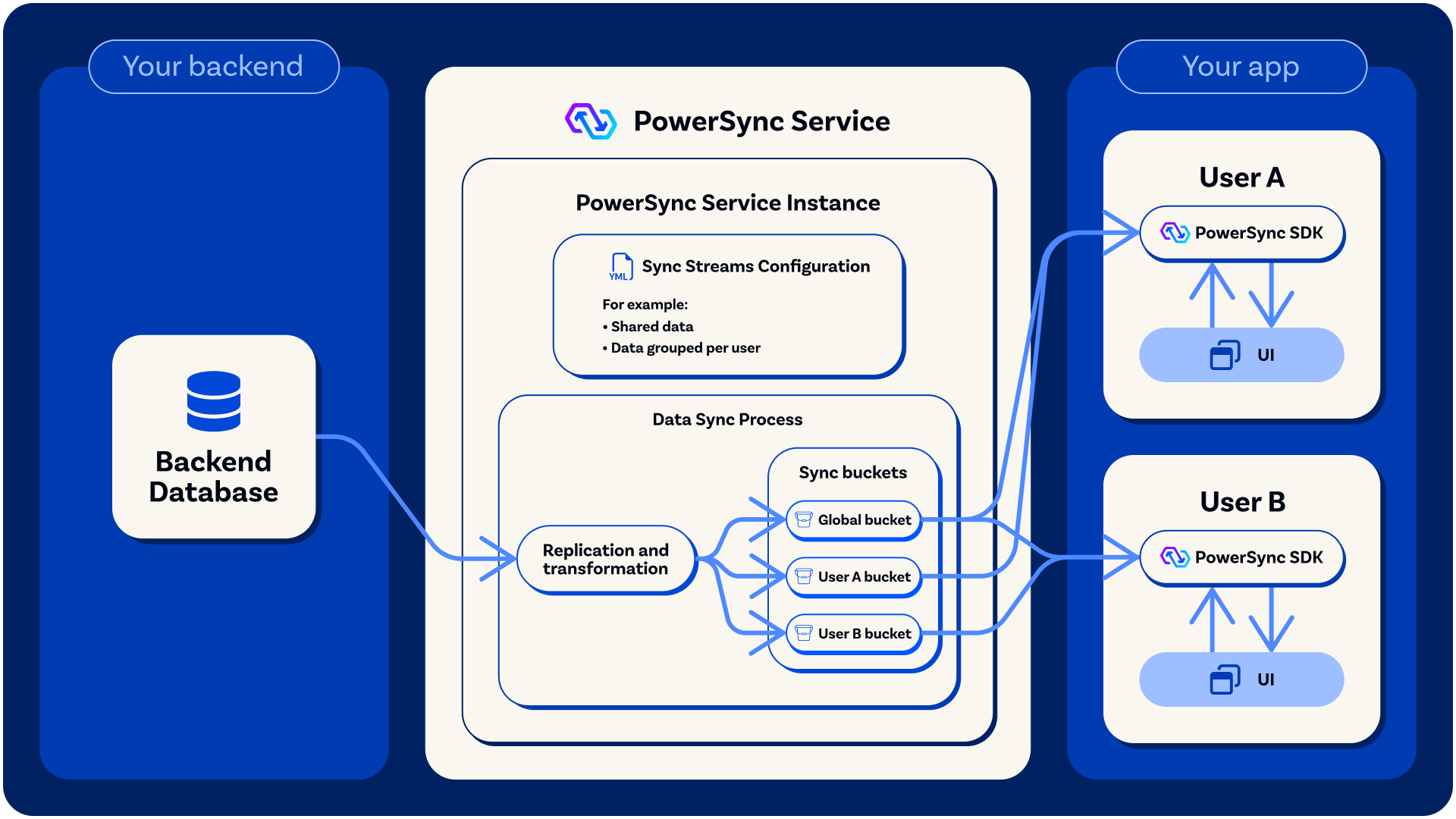
Operations in buckets are synced to clients in real-time based on Sync Streams/Rules, and a client-side SQLite database is materialized based on the data in the buckets.