

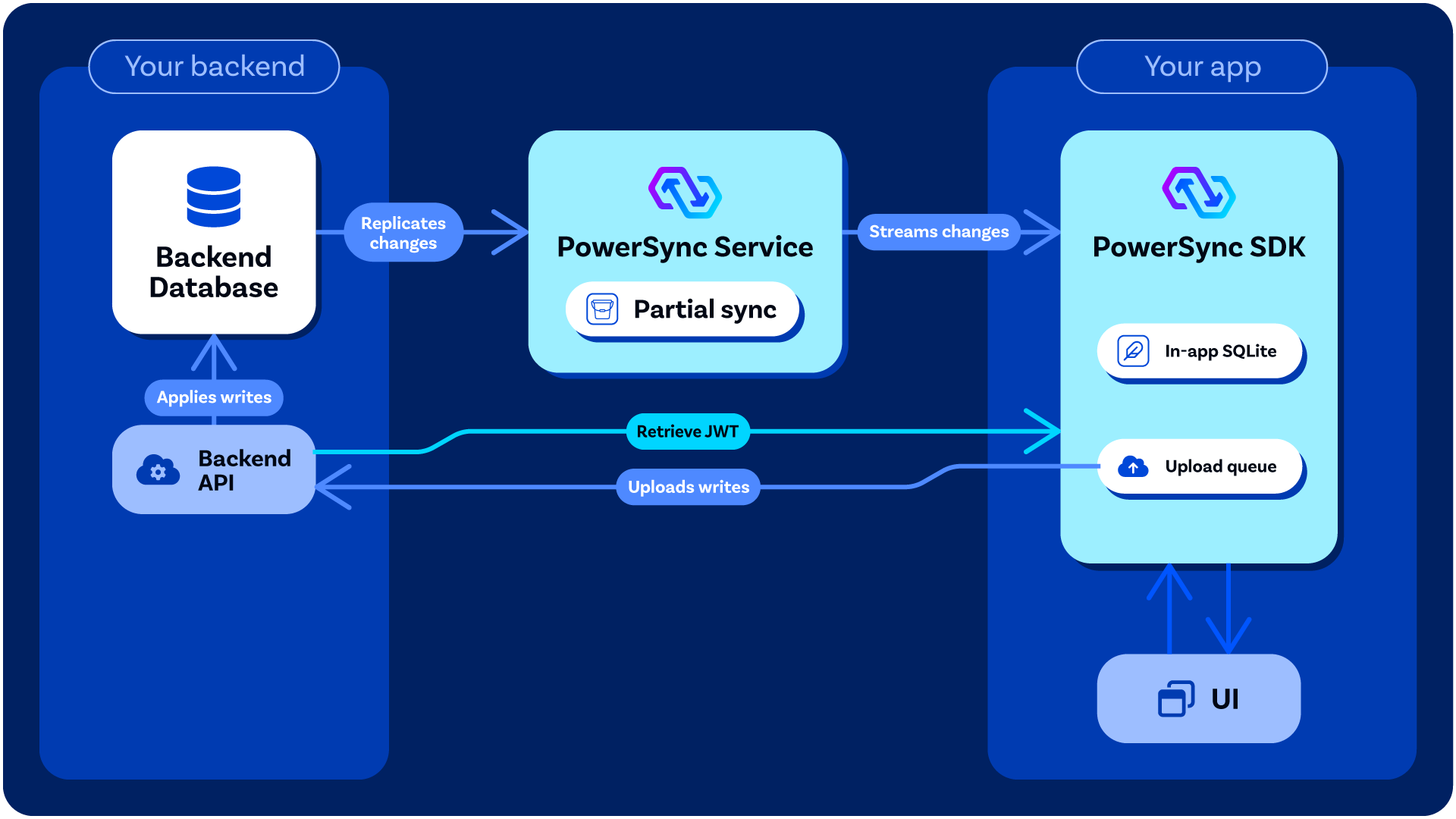
An overview of how PowerSync interacts with your backend application / API.
Processing Mutations From Clients
When your app writes to its local SQLite database, the client SDK places the mutations in an upload queue. It uploads them by calling theuploadData() function in your backend connector, which sends them to your write endpoint. Your write endpoint applies them to your source database (Postgres, MongoDB, MySQL, SQL Server, or Convex). This design keeps server-side validation and authorization of mutations under your control, while PowerSync itself requires minimal permissions.
Write Path Overview explains how this works. To pick a setup, see Choosing Your Setup.
Authentication (Optional)
Some authentication providers already generate JWTs for users which PowerSync can work with directly — see Authentication Setup. For others, some backend code/logic must be added to your backend application to generate the JWTs needed for PowerSync — see Custom Authentication. In your client-side backend connector implementation, you need to define thefetchCredentials() function so that it returns a JWT which can be used by PowerSync Client SDK to authenticate with the PowerSync Service.
Backend Options
If you already have some kind of backend application as part of your stack, it’s best to use that existing backend. See Use Your Existing API. Otherwise, there are several options for what you can use: (this is not an exhaustive list)Reference Write Implementation
If you don’t have a write endpoint yet, you can run the reference write implementation. It’s a Node.js write endpoint for Postgres, MongoDB, MySQL, and SQL Server, and it comes with a TypeScript backend connector for your app.Custom Backend
To build a write endpoint in your own backend stack, see Build Your Own Write Endpoint. Our Example Projects page provides example custom backends (e.g. Node.js, Django, Rails, .NET, etc.)Backend-as-a-Service / Developer Platforms
There are several backend-as-a-service developer platforms that work well with PowerSync, for example:- Supabase (for Postgres): Several of our demo apps demonstrate how to use Supabase as the Postgres-based backend. Supabase provides both an authentication service, PostgREST data APIs, and edge functions for more custom logic. See our integration guide. To apply mutations, choose between the PostgREST route and the Edge Function route.
- Neon (for Postgres): Similarly to Supabase, Neon provides PostgREST data APIs and an authentication service. See our integration guide.