
Client Authentication

PowerSync clients (i.e. apps used by your users that embed the PowerSync Client SDK) authenticate against the server-side PowerSync Service using JWTs (signed tokens).
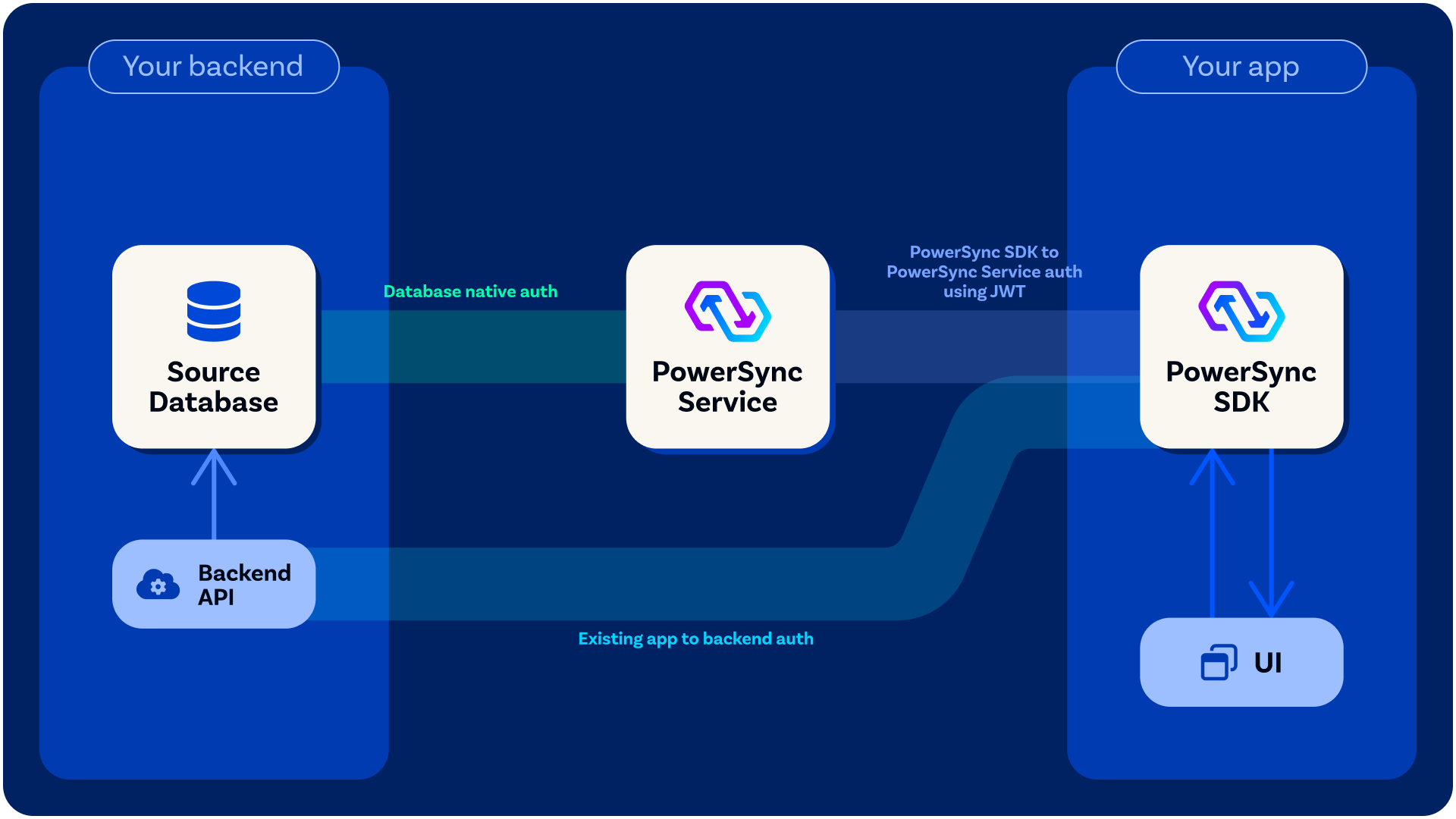
When you call connect() on the client-side PowerSync database, you pass a backend connector as an argument to it, in which you define a fetchCredentials() function that must return a JWT as well the endpoint URL for the PowerSync Service instance that the client will connect to. See here for example implementations. Your fetchCredentials() function will automatically be called by the PowerSync Client SDK whenever it needs it needs a fresh JWT.

Client Authentication Options

Development & Testing

For a quick way to get up and running during development, you can generate Development Tokens directly from the PowerSync Dashboard (PowerSync Cloud) or locally with a self-hosted setup.

Proper Authentication Integration (Needed for Production)

Use Existing JWT from Auth Provider: Some authentication providers already generate JWTs for users which PowerSync can verify directly — see Common Authentication Providers below. In this scenario, your fetchCredentials() function can return the existing JWT from your client-side state. Custom Auth Integration: Generate JWTs: For others, some backend code must be added to your application backend to generate the JWTs needed for PowerSync — see Custom Authentication. In this scenario, your fetchCredentials() function should make an API call to your backend application to obtain a JWT.

Common Authentication Providers

PowerSync supports JWT-based authentication from various providers. The table below shows commonly used authentication providers, their JWKS URLs, and any specific configuration requirements.
Scroll the table horizontally.
ProviderConfiguration NotesDocumentationJWKS URL
SupabaseUses Supabase’s JWT SecretSupabase Auth SetupDirect integration available
Firebase Auth / GCP Identity PlatformJWT Audience: Firebase project IDFirebase Auth Setuphttps://www.googleapis.com/service_accounts/v1/jwk/securetoken@system.gserviceaccount.com
Auth0JWT Audience: PowerSync instance URLAuth0 Setuphttps://{auth0-domain}/.well-known/jwks.json
ClerkAdditional configuration may be requiredClerk Documentationhttps://{yourClerkDomain}/.well-known/jwks.json
StytchAdditional configuration may be requiredStytch Documentationhttps://{live_or_test}.stytch.com/v1/sessions/jwks/{project-id}
KeycloakAdditional configuration may be requiredKeycloak Documentationhttps://{your-keycloak-domain}/auth/realms/{realm-name}/protocol/openid-connect/certs
Amazon CognitoAdditional configuration may be requiredCognito Documentationhttps://cognito-idp.{region}.amazonaws.com/{userPoolId}/.well-known/jwks.json
Azure ADAdditional configuration may be requiredAzure AD Documentationhttps://login.microsoftonline.com/{tenantId}/discovery/v2.0/keys
Google IdentityAdditional configuration may be requiredGoogle Identity Documentationhttps://www.googleapis.com/oauth2/v3/certs
SuperTokensAdditional configuration may be requiredSuperTokens Documentationhttps://{YOUR_SUPER_TOKENS_CORE_CONNECTION_URI}/.well-known/jwks.json
WorkOSAdditional configuration may be requiredWorkOS Documentationhttps://api.workos.com/sso/jwks/{YOUR_CLIENT_ID}
Custom JWTSee custom auth requirementsCustom Auth SetupYour own JWKS endpoint